레이블이 Graphics Programming인 게시물을 표시합니다. 모든 게시물 표시

2017년 10월 2일 월요일

Spherical harmonics

The purpose of this post

I don't want to explain the mathmatical details of spherical harmonics in this post. Actually I am not that good at math. There are tons of great article about spherical harmonics that has great mathematical explanations. But not many people try to read these article to understand this useful toolset because they cannot even imagine how useful this is. I just want to tell what spherical harmonics could do and emphasize one more time with some useful links. so I will focus on top level explanation and will try to use intuitive words as possible as I can.

What is spherical harmonics(SH)

Complex spherical function can be encoded as SH coefficients vector. In other words, you can compress cube map to several number of float vector although high frequency signal will be lost mostly. The process which transform complex function to sh vector is called Projection. You can find the mathematical details under SH on the internet. Like Robin Green's gritty detail or Sloan's stupid SH tricks papers. These two papers are the best explanation about spherical harmonics lighting. Maybe you might not be able to understand these article at once. But if you try several times you could understand one concept by one.

example usage

  • Lighting signal over sphere can be represented using SH.
  • Visibility(Shadow signal) over hemisphere can be represented using SH.
  • BRDF can be can be represented using SH. For example lambert diffuse BRDF.

spherical harmonics dot product

Integral of product of two functions can be done by simple dot product. Many article will tell you that this is the most important property of spherical harmonics. Usually many integral problem like diffuse lighting convolution(adding all diffuse lighting contribution over hemisphere) cannot be calculated at runtime, but can be done if we use spherical harmonics. In other words the rendering equation can be solved using spherical harmonics at least for diffuse surfaces.
The process is like below(very simplified version. You can find all detail explanation on the internet). This is most basic and simple usage of spherical harmonics in lighting.
  • You need SH coefficients vector which is projected from lighting over sphere(ex : cube map).
  • You need SH coefficients which represents clamped cosine function.
  • Simple Dot product of two coefficients is same as sum of all irradiance over hemisphere.
  • Evaluate Irradiance for certain normal.

Adding spherical harmonics coefficients

Adding two spherical harmonics lighting coefficients vector means that adding two lighting signal.This is also very simple and useful property. I think this is so intuitive property so there aren't much to talk about this.
  • You have sh vector for skylight and sh vector for some bounced lighting from the floor.
  • Adding these two sh vector results to sh vector which has both lighting signals.

Multiplying two spherical harmonics signal

Adding two sh vector makes sh vector which represents added spherical signal. And dot product of two sh vector results integral of product of two signal(ex : diffuse lighting convolution). But what if when we need some new sh vector which is the result of multiplication of two spherical signals. For example, we multiply shadow function to lighting signal. This cannot be done by adding or dot product. Maybe you can imagine multiplying vector component by component would do this magic but it is not that simple. And it is one of most difficult concept relating spherical harmonics. Actually this operation is vector-matrix multiplication. If we have light sh vector and shadow sh vector, we can multiply some special matrix which is made from shadow sh vector to light sh vector. This is called Triple product integral. There is good article explaining how this works(Better than Robin Green's).

Rotation of spherical harmonics

We can rotate spherical harmonics vector. Rotation of spherical harmonics vector is the most difficult concept to understand among the sh toolsets. But important thing is that we can rotate spherical harmonics. But when do we need this? Suppose you encoded ambient occlusion signal for each vertex for skinned mesh(animated character), you will have to rotate the AO SH vector like we rotate normal vector according to movement of vertex. You can find the underground detail in Robin Green's article. And also can find optimized rotation method from below link.

Convenient zonal harmonics

Zonal harmonics is rotationally symmetric basis functions among all sh basis whose m number is zero. These basis is frequently used to approximate functions which is symmetric along z axis. 
  • Simple Diffuse Transfer function).
  • Adding analytic lighting to existing sh vector.
  • Light Propagation Volume uses ZH for light injection to voxel.

Spherical Harmonics code in UE4

You can learn about spherical harmonics usage from UE4. There are several typical use case like light map evaluation(UE4 uses sh light map), and irradiance volume evaluation. In BasePassPixelShader.usf, you can find GetPreComputedLighting function, and you could learn how actual sh lighting shader code looks like. Like I said before, It is simple dot product between lighting sh vector and diffuse transfer function made from normal vector. If you are more curious person you could look into Lightmass source code and could find how lighting and ambient occlusion signal is projected to light map. If you are working on UE3, LightEnvironment gathers static light to one 3rd order spherical harmonics vector analytically for moving character in CPU. This is also very interesting use case of spherical harmonics. Maybe there are more SH use cases in Unrealengine, for example skylighting, you could look for another one for fun.

2016년 1월 8일 금요일

Improving outline postprocess using stencil operation.

There is excellent tutorial for Outline postprocess.

http://www.tomlooman.com/ue4-outline-post-process/

His technique support pretty outline using custom depth(simliar technique is already being used by editor selected object), and also provide nice multi color feature too.

But what if your game designer want to specify occluders who cause occludee outlined?

Here is my solution.

1. occludee writes team color ID to stencil.
2. occluder increment stencil by 1(to do this, we need to slightly modify custom depth path, PrimitiveComponent has occluder/occludee flag and it is rendered seperately in custom depth path)
3. In PostProcess, only increment stencil pixel is considered as "outlined"

This is very useful when there are too much outline in screen, and we want to use only needed.


2013년 2월 3일 일요일

Deferred Shadow.

I added shadow into my test engine.
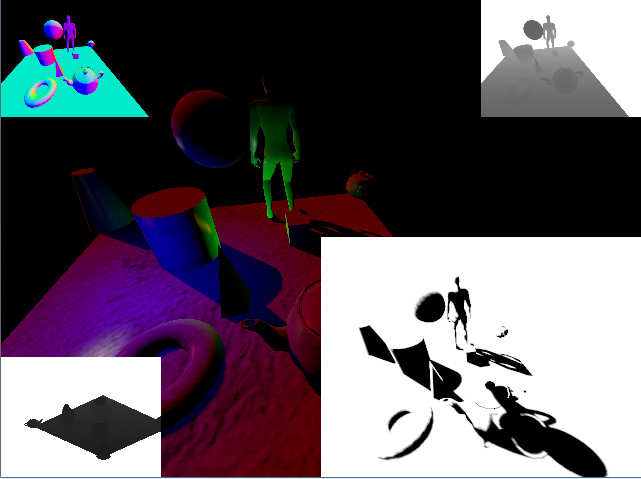
It is called "deferred shadow". It is same with standard shadow technique, except that the shadow term is calculated in the deferred pass. Like deferred shading, we can reconstruct shadow space depth and compared this value to shadow map pixel value. Like deferred shading, this technique simplify engine architecture very much.


2013년 1월 18일 금요일

Weird thing in converting device depth to linear depth.

Below is the functions I used to convert device depth to linear depth. I derived this code from the projection matrix.


// Projection._34 = zn*zf/(zn-zf)
// Projection._33 = zf/(zn-zf)
//float A = Projection._34;
//float B = Projection._33;
float A = ProjectionParams.z/zf;
float B = ProjectionParams.w;

float LInearZ = A/(DeviceZ + B);

It did not work. when ZNear value is not small, resulting linear depth was smaller than the real linear depth.

But when I change the code like below, It worked.

// Projection._34 = zn*zf/(zn-zf)
// Projection._33 = zf/(zn-zf)
//float A = Projection._34/zf;
//float B = Projection._33;
float A = ProjectionParams.z;
float B = ProjectionParams.w;

float LInearZ = A/(DeviceZ + B);

The difference is deviding by 'zf' is done in CPU code. It is exactly same as the crytek's GetLinearDepth function. I still don't know what is the cause. 

2013년 1월 16일 수요일

read only depth stencil view in deferred shading.

In deferred shading, We have to both reading and writing with depth buffer. And We can't set depth buffer as rendertarget and set shader resource simultaneously.
So we have to create additinal read only depth stencil view and set it as rendertarget when lighting pass. If not, reading depth buffer will fail.


D3D11_DEPTH_STENCIL_VIEW_DESC desc;
desc.Flags = D3D11_DSV_READ_ONLY_DEPTH;


I wandered for 3 hours about this.

2013년 1월 14일 월요일

Calculating global time for animation clip.

The "Game engine architecture book" says that using global time instead of local time has several benefits. So I applied this algorithm to my current animation implementation.

Here is source code for calculating local time from global time.


float CurrentGlobalTime = GEngine->_TimeSeconds;
float NT;
if(_NumPlay == 0)
{
    NT = FLOAT_MAX;
}
else
{
    NT = _Clip->_Duration*(float)_NumPlay;
}

_LocalTime = fmod(Math::Clamp<float>((CurrentGlobalTime - _StartTime)*_TimeScale, -NT, NT), _Clip->_Duration);

if(_LocalTime < 0)
{
    _LocalTime = _Clip->_Duration + _LocalTime;
}

It works for loop and plus and minus time scale, but I think handling minus time scale is a little dirty.

looping


3x faster

repeat 3 times and stop


reverse (minus time scale)


2013년 1월 8일 화요일

Skinning


First image shows unskinned mesh and current pose(red).
Next image shows skinned mesh and bind pose. Ugly stretched line is missing bind pose matrices(these are not skinned to mesh).

FBX was quite confusing and I think I need some refactoring of some codes.

2013년 1월 4일 금요일

Skeleton/Pose

Today, I imported skeleton data from FBX. I referenced the "Game Engine Architecture" book about data structure for the skeleton and poses. After that, calculated bone matrices. Next small objective is to render skinned mesh using GPU skinning. I think I would use uniform buffer approach for bone matrices.

I have done programming some kind of animation engine many years ago already. I've know this concept and know exactly how to do it. But doing this with dx11 and for completely hobby project is great. I don't even play games recently.

I've realized that my favorite hobby is engine/graphics programming. Unfortunately, Componies who is developing their own engine is rapidly disappearing. Anyway, It may be fun because it is just hobby~

2012년 12월 30일 일요일

Started DirectX11 Project(Fbx Sdk today)

I stopped native directx programming a few years ago. I thought that I don't have to use it directly anymore. I thought that It is OK to understand it. But the day before yesterday, I opened directx11 tutorial project. I am planning to write an engine with directx11 features only. hmmm I just succeeded about importing FBX static mesh file. FBX is much easier that 3dsmax sdk. Why am I doing this now? In the age full of free or cheap excellent engines like udk/unity3d? Yes, just reading the code is not enough, After writing down the code from scratch, I really understand the things.

Now I am familiar with the concept of resource view and some other d3d objects. The next small objective would be animation. I would reference game engine architecture book  for animation data structure.

And after some considering, I've decided that not using seprated vertex buffers for position/normal/tex things. It could be convenient a little. but for performance reason, most engines does not seem to use that feature. but gothic3 game seems to use similar technique(buffer streaming feature in d3d9).